在之前的文章有介绍Function Call的一些基本用法,在这里我会重新介绍一下
核心是把默认获得的IchatClient转换成使用UseFunctionInvocation中间件的对话助手,此时这个中间件就拦截你的请求,能够进行函数的调用
对于tools我们使用AITool类型集合进行存储,并且在发送对话的Option中传递给LLM
LLM会收到我们的请求和方法描述,它会决定调用哪一些函数并且返回一个响应报文,此时客户端收到报文后在本地执行对于函数,并把函数返回值给到LLM,这样持续迭代直到默认设置迭代次数或者不需要调用,最终LLM会收集之前所有的Context对你的请求做出一个最终输出
using System.Diagnostics;
using System.Text.Json;
using System.Threading;

// 创建模拟工具集
var monitoringTools = new[]
{
    AIFunctionFactory.Create((string city) =>
    {
        Thread.Sleep(500); // 模拟API延迟
        return new { Temperature = Random.Shared.Next(15, 35), Humidity = Random.Shared.Next(40, 80) };
    }, "get_weather", "获取指定城市的天气信息"),

    AIFunctionFactory.Create((string city) =>
    {
        Thread.Sleep(300);
        return new { Hotels = Random.Shared.Next(50, 200), AvgPrice = Random.Shared.Next(300, 1500) };
    }, "get_hotels", "查询指定城市的酒店数量和平均价格"),

    AIFunctionFactory.Create((int temperature) =>
    {
        return temperature switch
        {
            < 15 => "建议穿冬装,携带保暖衣物",
            < 25 => "建议穿春秋装,温度适宜",
            _ => "建议穿夏装,注意防晒"
        };
    }, "suggest_clothing", "根据温度推荐穿搭")
};

// 构建带监控的客户端
int iterationCount = 0;
int functionCallCount = 0;

var monitoredClient = chatClient.AsBuilder()
    .UseFunctionInvocation(configure: options =>
    {
        options.AllowConcurrentInvocation = true;
        options.MaximumIterationsPerRequest = 10;
        options.FunctionInvoker = async (context, cancellationToken) =>
        {
            functionCallCount++;
            var sw = Stopwatch.StartNew();

            Console.WriteLine($"\n🔵 [函数调用 #{functionCallCount}]");
            Console.WriteLine($"   函数名: {context.Function.Name}");
            Console.WriteLine($"   参数: {JsonSerializer.Serialize(context.Arguments)}");

            var result = await context.Function.InvokeAsync(context.Arguments, cancellationToken);
            sw.Stop();

            Console.WriteLine($"   结果: {result}");
            Console.WriteLine($"   耗时: {sw.ElapsedMilliseconds}ms");

            return result;
        };
    })
    .Build();

// 执行复杂查询
Console.WriteLine("━━━━━━━━━━━━━━━━━━━━━━━━━━━━━━━━━━━━");
Console.WriteLine("📋 用户查询:帮我查询北京和上海的天气,并根据北京的温度推荐穿搭\n");

var monitoringOptions = new ChatOptions
{
    ToolMode = ChatToolMode.Auto,
    AllowMultipleToolCalls = true,
    Tools = monitoringTools
};

var monitoringResult = await monitoredClient.GetResponseAsync(
    "帮我查询北京和上海的天气,并根据北京的温度推荐穿搭",
    monitoringOptions
);

Console.WriteLine("\n━━━━━━━━━━━━━━━━━━━━━━━━━━━━━━━━━━━━");
Console.WriteLine("✅ 最终响应:");
Console.WriteLine(monitoringResult.Text);
Console.WriteLine($"\n📊 统计: 共 {iterationCount} 次迭代,{functionCallCount} 次函数调用");
这里主要介绍FunctionInvoker
它类似.NetCore的中间件!
可以进行如异常处理,权限验证等,因为它是在执行具体逻辑之前执行的逻辑
using System.ClientModel;
using System.Diagnostics;
using System.Text.Json;
using System.Threading;
using Microsoft.Extensions.AI;
using OpenAI;

namespace FunctionCallingDeep;

class Program
{
    static async Task Main(string[] args)
    {
        string baseUrl;
        string apiKey;
        string model;
        // 创建一个可能失败的工具
        int callAttempt = 0;

        var unreliableTool = AIFunctionFactory.Create((string orderId) =>
        {
            callAttempt++;
            Console.WriteLine($"   [尝试 #{callAttempt}] 查询订单 {orderId}");

            // 前两次调用失败,第三次成功
            if (callAttempt < 3)
            {
                throw new InvalidOperationException($"数据库连接超时 (尝试 {callAttempt}/3)");
            }

            return new { OrderId = orderId, Status = "已发货", EstimatedDelivery = "2024-10-15" };
        }, "query_order", "查询订单状态");

// 配置错误处理客户端
        var chatClient = MEAIConsole.Program.GetDefaultChatClient(baseUrl, apiKey, model);
        var errorHandlingClient = chatClient.AsBuilder()
            .UseFunctionInvocation(configure: options =>
            {
                options.MaximumConsecutiveErrorsPerRequest = 5; // 允许更多错误重试
                options.IncludeDetailedErrors = true; // 让模型看到错误详情
                options.FunctionInvoker = async (context, cancellationToken) =>
                {
                    try
                    {
                        return await context.Function.InvokeAsync(context.Arguments, cancellationToken);
                    }
                    catch (Exception ex)
                    {
                        Console.WriteLine($"   ❌ 函数执行失败: {ex.Message}");
                        throw; // 重新抛出,让 FunctionInvokingChatClient 处理
                    }
                };
            })
            .Build();

        Console.WriteLine("━━━━━━━━━━━━━━━━━━━━━━━━━━━━━━━━━━━━");
        Console.WriteLine("🧪 测试:模拟函数调用失败与重试\n");

        callAttempt = 0; // 重置计数器

        try
        {
            var errorResult = await errorHandlingClient.GetResponseAsync(
                "帮我查询订单号 ORD123456 的状态",
                new ChatOptions
                {
                    ToolMode = ChatToolMode.Auto,
                    Tools = [unreliableTool]
                }
            );

            Console.WriteLine("\n✅ 最终成功!");
            Console.WriteLine($"响应: {errorResult.Text}");
        }
        catch (Exception ex)
        {
            Console.WriteLine($"\n❌ 达到最大错误次数,请求终止: {ex.Message}");
        }
    }
}
关于invoke的实现逻辑
public class ManualFunctionCallingClient : DelegatingChatClient
{
    private readonly IList<AITool> _tools;

    public ManualFunctionCallingClient(IChatClient innerClient, IList<AITool> tools)
        : base(innerClient) => _tools = tools;

    public override async Task<ChatResponse> GetResponseAsync(
        IEnumerable<ChatMessage> messages,
        ChatOptions? options = null,
        CancellationToken cancellationToken = default)
    {
        var messageList = messages.ToList();
        var maxIterations = 10;
        var iteration = 0;

        while (iteration++ < maxIterations)
        {
            // 1. 调用 AI 模型
            var response = await base.GetResponseAsync(messageList, options, cancellationToken);

            // 2. 检查是否有函数调用请求
            var functionCalls = response.Message.Contents.OfType<FunctionCallContent>().ToList();
            if (functionCalls.Count == 0)
            {
                // 没有函数调用,返回最终结果
                return response;
            }

            // 3. 执行每个函数调用
            foreach (var functionCall in functionCalls)
            {
                // 查找对应的工具
                var tool = _tools.FirstOrDefault(t => t.Name == functionCall.Name);
                if (tool == null)
                {
                    // 处理未知函数
                    messageList.Add(new ChatMessage(
                        ChatRole.Tool,
                        new FunctionResultContent(functionCall.CallId, "未知函数")
                    ));
                    continue;
                }

                try
                {
                    // 解析参数
                    var arguments = JsonSerializer.Deserialize<Dictionary<string, object>>(
                        functionCall.Arguments ?? "{}"
                    );

                    // 执行函数
                    var result = await ((AIFunction)tool).InvokeAsync(arguments, cancellationToken);

                    // 添加结果到对话历史
                    messageList.Add(new ChatMessage(
                        ChatRole.Tool,
                        new FunctionResultContent(functionCall.CallId, result?.ToString())
                    ));
                }
                catch (Exception ex)
                {
                    // 错误处理
                    messageList.Add(new ChatMessage(
                        ChatRole.Tool,
                        new FunctionResultContent(functionCall.CallId, $"执行失败: {ex.Message}")
                    ));
                }
            }

            // 4. 将函数调用的消息添加到历史
            messageList.Add(response.Message);
        }

        throw new InvalidOperationException("达到最大迭代次数");
    }
}

// 使用
var manualClient = new ManualFunctionCallingClient(baseClient, tools);
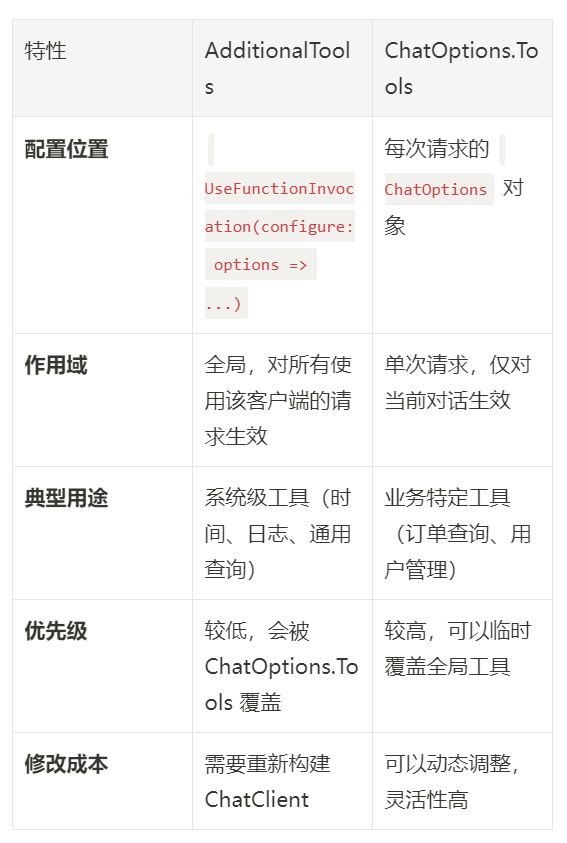
AdditonalTools And ChatOptions.Tools